UIS Command Button Tool
 A UIS Command Button can send any type of UIS command to a device. The button can be configured to prompt the user for a parameter value or the parameter value can be pre-defined in the button. A UIS Command Button can also be configured to prompt a user for a confirmation.
|
UIS Command Button Examples |
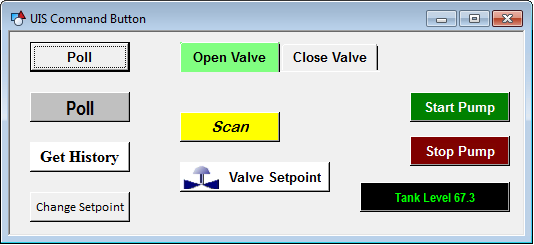
The default button shape is a square button. The ButtonShape property can be used to change the shape to an active tab or an inactive tab.
The face of the button can show a label or point attributes, and it can be configured to show a bitmap and point state (concurrently or independently). The object’s [DisplayItem] property determines the point attribute to be displayed. If this property is set to Text, the text listed in the Text property will be displayed. Use this configuration for a label. the Text property can contain both static and dynamic text. The dynamic portion of the string is built using one or more tokens. All other options in the [DisplayItem] property are point attributes. These attributes include point configuration attributes, point CVS record attributes, and facility attributes.
To show point attributes or the point state on the button face, the button must be associated with a point using the point identifier properties to form a fully qualified CygNet tag string. The point identifier properties are [1:SiteService], [2:Point ID], [3:Long Point ID], [4:Facility ID], and [5:UDC].
Note: If the button is on a templated screen, only use the [5:UDC] property.
The [AlarmElement] property can be set to show the point state color in the object’s Background Color, the Foreground Color, or not at all (None). When set to None, the color specified for each component is shown. If set to one of the other options, the component color is replaced with the point state color.
The [UseCustomStateColors] property enables the object to use its own custom point state colors. If set to 1 - Yes, the colors used are those defined by the object’s [CustomStateColors] property. If set to 0 - No, the colors are those defined by the TheView’s [CustomStateColors] property.
The command priority for a scripted UIS command can be assigned; by setting the UisCmdPriority=<priority> parameter where <priority> is one of the following 'Low', 'Medium', 'High', 'User', or 'Admin'.
See Prioritizing Messages in the Communication Queue for more information.
More:
 UIS Command Button Tool - Command Name
UIS Command Button Tool - Command Prompt

